


TL;DR: Email continuity for small tax practices: what it does, what it costs, and what it means for your WISP
At the time of publishing (November 13th @ 2 PM Central), Microsoft has begun to bring servers back online.
Thursday, November 12. Around midday Eastern, Outlook stopped loading for a lot of Microsoft 365 users. Everyone restarted their computer because that’s what most of us do when there is an issue, and to be honest, that tends to solve a lot of issues. But not this.
Microsoft said it was investigating “reports of users experiencing issues accessing Exchange Online mailboxes through multiple connection methods in the Americas,” then said users in any region could be affected (KSAT). Its status page said users “may be unable to access their mailbox using Outlook on the web, Outlook desktop (MAPI), Exchange ActiveSync (EAS), or REST-based connections, and email delivery may be delayed.” Features of Teams, SharePoint, and Copilot that depend on Exchange were hit too, while core Teams messaging and direct SharePoint file access stayed largely functional (Microsoft 365 Service Health).
It didn’t stay an afternoon. By 11:57 AM Central on Friday, November 13, the incident had run into a second day. Microsoft reported “broad recovery and stability” but still listed a service degradation and said it would “continue to restore service to remaining customers and regions” (Microsoft 365 Service Health).
In its November 13 update, Microsoft explained: “The incident was introduced by an issue during an earlier network capacity upgrade that surfaced following a recent network change.” It said it had addressed the underlying issue, called it “a technical issue not related to cyber or AI / agents,” and promised “a full post-incident report” (Microsoft 365 Service Health). That’s all I’m going to claim until the report is out. It also wasn’t a first: on August 31, Exchange Online had a widespread outage with “authentication-related errors” (BleepingComputer).
For a tax practice, the useful question isn’t which Microsoft component failed. It’s whether you could still get a signed authorization, answer a payment question, or reach a client while Outlook was down. And if Microsoft 365 goes down, why should your ability to communicate go down with it?
Here’s what email continuity actually does, what it costs, what it means for your §7216 and WISP obligations, and whether a small practice should bother.
An Outage Is an Inconvenience Until a Deadline Shows Up
An afternoon without Outlook in August is a long coffee break. But on April 14th this would be a completely different story.
An email outage doesn’t automatically extend a filing, payment, or other deadline. Your inbox isn’t a filing location. Penalty relief is a separate, after-the-fact question. The IRS does list “System issues that delayed a timely electronic filing or payment” as a possible reasonable cause (IRS), but nobody should plan a practice around winning an abatement.
Small firms feel this more. A 200-person firm has someone whose job is to post an update and call the vendor. A three-person practice has whoever is closest to the router.
You shouldn't use email for client documents and other confidential matters. Instead, use a secure portal. But I know many people are not doing this.
Four Products That Get Sold as One
Vendors blur these together. They aren’t interchangeable.
Email security gateway: a filter in front of your mailbox that screens spam, phishing, and malicious attachments.
Spooling: when your mail server won’t accept messages, the gateway holds them and delivers them later, within its retention limits. The mail is waiting. You still can’t read it.
Full continuity: an emergency mailbox on the vendor’s own systems where staff can read, reply, and send from their normal address while Microsoft is down.
Backup and archiving: copies of past messages for recovery, retention, or legal holds. Handy for finding last month’s thread. Not a way to send today’s reply.
Continuity Depends on More Than Mail Delivery
Normally, your domain’s MX record (the DNS entry that tells the world where to deliver your mail) points at Microsoft. With a continuity service, it points at the vendor:
Internet → independent email gateway → Microsoft 365
Internet mail hits the vendor first, gets filtered, and gets handed to Microsoft. Microsoft’s guidance for this setup says to “Lock down your Exchange Online organization to only accept mail from your third-party service” (Microsoft Learn), so nobody can go around the filter. When Microsoft can’t take delivery, the vendor holds the mail, and with full continuity, your staff log into an emergency inbox and keep working. When Microsoft comes back, the vendor delivers the queue.
Three details decide whether that works on the day you need it.
What triggers it. Proofpoint says its Emergency Inbox “automatically kicks in from the very moment a problem hits” (Proofpoint). Barracuda starts spooling “immediately” when it determines your mail server is offline and turns on continuity 10 minutes later, but only if an admin set spooling and “Auto-Enable” ahead of time (Barracuda). Mimecast is blunt: its monitor “does not start a Continuity event,” and “An Administrator must still start the event manually” (Mimecast). If the administrator is you, in March, that matters.
Some automatic triggers watch delivery, not whether your staff can open a mailbox. This outage disrupted both. SparkPost, a bulk email service, said that at the worst point more than 9 in 10 of its delivery attempts to Microsoft were being deferred (SparkPost status), and Mailprotector reported that Microsoft’s servers were temporarily deferring messages from its gateway (Mailprotector status). Deferrals like that can trigger spooling or continuity, depending on the product and how it’s set up. They don’t prove anyone’s emergency inbox switched on. And the next outage may look different. If Microsoft accepts a message but your staff can’t open the mailbox, a product triggered only by failed delivery may never switch on, and the message you need may be out of reach unless the vendor keeps its own copy. Ask every vendor what happens in that case and whether it keeps an accessible copy of recent mail. Mimecast’s Online Inbox shows the last 30 days (Mimecast), and Mailprotector’s XtraMail keeps a rolling 30-day copy (Mailprotector).
How people sign in. Many of these products let users log into the emergency inbox with their Microsoft account. Convenient, until the outage involves Microsoft’s sign-in. Barracuda documents the same failure for directory logins: if your LDAP server goes offline, “users will be unable to log into Email Continuity” (Barracuda). Mimecast tells admins to keep at least one administrator on a Cloud password “without Single Sign On enforced” (Mimecast). Microsoft’s update didn’t identify a general sign-in outage this time, but you don’t get to pick which outage you get. If getting into your emergency mailbox depends on Microsoft, or sends a password reset to Outlook, it isn’t independent.
What happens afterward. Barracuda says headers and timestamps from the outage are “synchronized to the primary mail server” (Barracuda). Mailprotector says, “There isn’t any synchronization with O365,” so users email their sent items to themselves (Mailprotector). Either way, someone should reconcile what was sent during the outage. If timing matters, keep the original message and have IT review its headers and mail logs. Don’t rely on the time your inbox displays.
None of this brings back Teams, SharePoint, OneDrive, your calendar, the client files stored there, or apps that sign in through Microsoft. Continuity covers mail.
What’s Actually Available to a Small Firm
I read and confirmed the vendors’ own documentation on November 12, 2026. Where a vendor doesn’t publish a price, I say so. (This isn’t sponsored, and I’m not compensated by any of these companies.
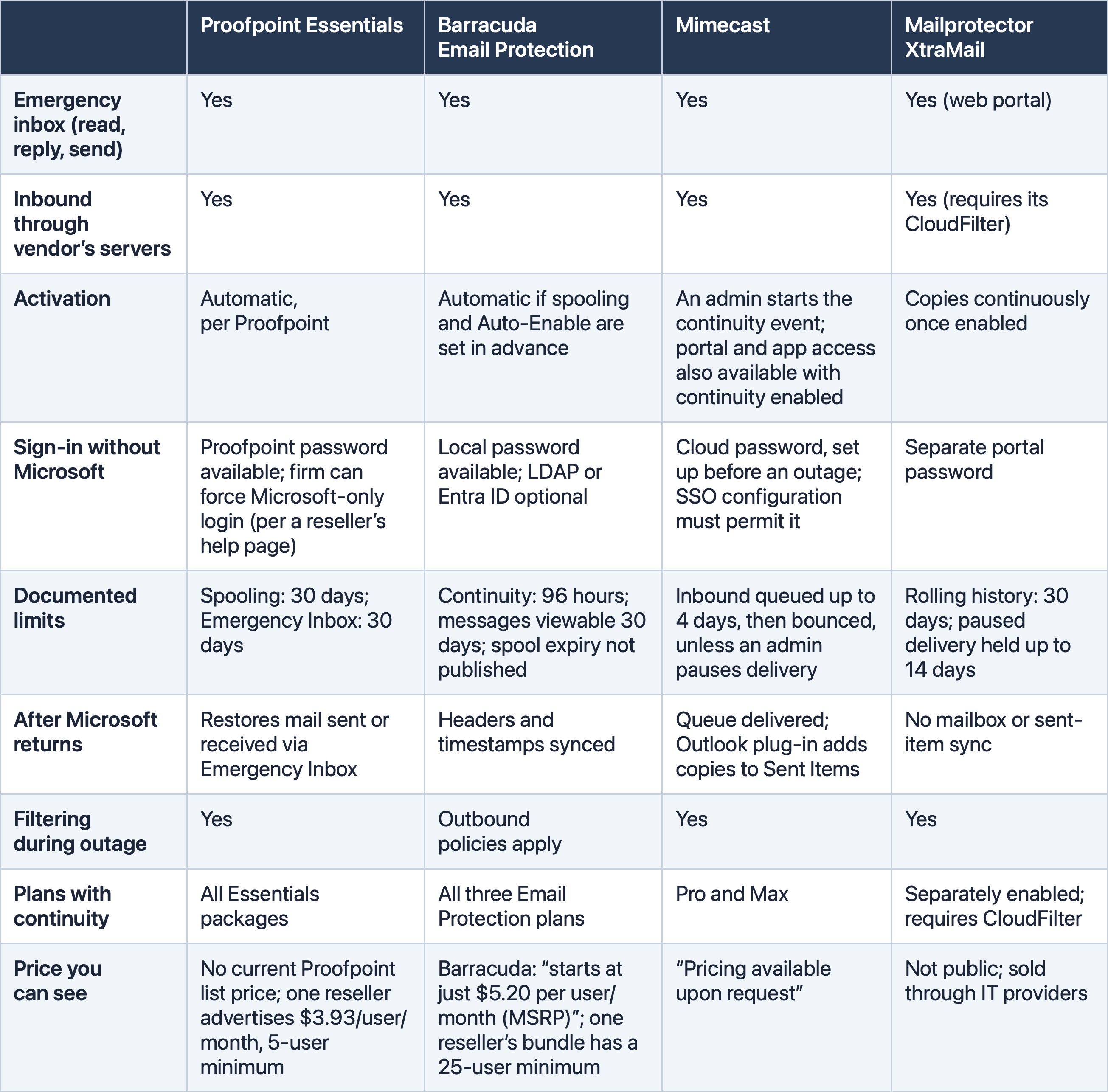
Sources: Proofpoint packages, Proofpoint Emergency Inbox, Vircom on Proofpoint login, Iron Cove listing, Barracuda plans, Barracuda continuity, BarraGuard listing, Mimecast plans, Mimecast continuity events, Mailprotector XtraMail, XtraMail KB.
One note: Mimecast’s continuity doesn’t support the New Outlook for Windows (Mimecast), so check your setup before buying.
One more thing about the “documented limits” row. Those numbers measure different things: how long mail queues, how long continuity stays active, and how much history you can read. An outage that runs into a second day makes all three matter. Confirm each limit, when its clock starts, and who acts before it runs out.
Translation: first check what your current email or IT provider already includes, then compare complete quotes for the package that actually has the emergency inbox, not the “starts at” number.
The FTC Already Answered the Vendor Question
The Safeguards Rule is clear. Tax preparation services are financial institutions (16 CFR 314.2(h)(2)(viii)), and a “service provider” is anyone that “receives, maintains, processes, or otherwise is permitted access to customer information” through services provided to you (314.2(r)). An email gateway fits.
So you oversee it under 314.4(f): choose a provider capable of appropriate safeguards, require them by contract, and periodically assess it. Encryption (314.4(c)(3)) and MFA (314.4(c)(5)) reach that system too, including the vendor’s admin console and the emergency inbox. The rule’s alternatives are narrow: compensating controls only where encryption is infeasible, and MFA substitutes only with your Qualified Individual’s written approval.
One nuance for small firms: if you maintain customer information on fewer than 5,000 consumers, the written incident response plan requirement in 314.4(h) doesn’t apply by rule (16 CFR 314.6). The WISP and vendor oversight still do. And the IRS still tells you to “Create both an Incident Response Plan & a Breach Notification Plan” (Publication 5708) and to “Develop a continuity plan” (Publication 4557). Neither mentions email continuity specifically. That part’s on us.
And if this outage pushes you to add a continuity provider or materially change how your mail flows, 314.4(g) has you evaluate and adjust your security program for it. The under-5,000 exception doesn’t remove that.
Without a Plan, Your Staff Will Improvise One
When email dies, people don’t stop working. They text. They open a personal Gmail. They start a WhatsApp thread. Security researcher Ken Munro told the BBC that’s the risk: “If email is down, many will move to WhatsApp and other platforms, so there’s a risk to sensitive data being shared on less secure platforms” (BBC).
For a tax office that’s more than a security tip. Forwarding client tax documents through a personal account can bring in a provider the firm has never reviewed, and the same §7216 and Safeguards analysis applies to it. Decide now which fallback channels are approved. A client who texts you a W-2 on their own is a different situation: handle it under your policy and point them back to the portal.
Outages also bring fake support offers. One BBC reader said a caller claiming to be from Microsoft asked his office for login details to restore access. His office doesn’t use Microsoft 365 (BBC). Tell staff to verify unexpected support contacts through a channel they already know, and never to give a password or sign-in code to someone who called them.
Put It in the WISP
You don’t need a new binder. Here’s a starting point to adapt, not copy:
Email service disruption. If email becomes unavailable during working hours (including filing-season evenings and weekends), [owner, with named alternate] will check for urgent deadlines immediately, contact affected clients by phone or portal, and start [our continuity service / our fallback procedure] within [target time]. We don’t wait for a provider status announcement. Instructions and essential client contacts are kept somewhere that doesn’t depend on our email provider. Staff use [independent access method], protected by MFA, with account recovery that doesn’t route through our primary email. Sensitive documents go through [secure portal], not unencrypted email. Staff use only approved channels for client information and don’t forward tax documents through personal accounts. [Vendor]’s safeguards, retention, data locations, and the §7216 exception or consent we rely on are documented in [vendor record]; if we rely on §301.7216-2(d)(2), every individual receiving information gets the required written notice. If the disruption continues, [owner] reviews pending deadlines and updates affected clients each working day. Before we go back to normal, [owner] sends and receives a test message with an outside address and checks for queued or bounced mail, then reconciles what was sent and received. We test this procedure before filing season and after any material change.
Continuity Adds Another Vendor to Manage
Continuity is a resilience decision, not an automatic security upgrade. Adding a vendor means:
Another company holding client information, with its own retention, storage locations, subcontractors, and breach-notification terms to read.
Another admin console to protect. Whoever controls the gateway can read mail before Microsoft ever sees it.
Separate logins and recovery. That’s the point, and one more thing people forget.
DNS work that can go wrong. Routing or authentication mistakes with MX, SPF, DKIM, or DMARC can delay, reject, or misclassify legitimate mail. Send a test from the emergency inbox and confirm it passes DMARC. (I covered these acronyms in Your Practice Deserves Its Own Email.)
Its own outages. The gateway now sits in front of all your incoming internet mail. If it goes down while Microsoft is fine, mail stops anyway. Ask about its status page and track record too.
Its own bad day when Microsoft has one. A widespread outage puts extra demand on the fallback. On November 13, Mimecast reported that “high demand on our email search services is causing intermittent errors” in its end-user apps, including the Personal Portal, for some customers. About three hours later, it said the errors had stopped (Mimecast status). Test the fallback, and keep a phone-and-portal procedure too.
The Price Only Makes Sense Against Your Workflow
Take this outage’s rough timeline and move it. (The duration varied by firm.) A five-person firm loses Outlook late on the morning of April 14 and is still waiting on a full recovery at lunch on April 15. Even after Outlook opens, queued mail may still be arriving, and some may not arrive at all. During the November outage, Microsoft extended its own email timeout window to 48 hours “to help protect delayed messages” (iTnews), and SparkPost still told its customers that messages with short expiration settings had expired and bounced (SparkPost status). Meanwhile, the firm has lost more than a day of timely replies.
On cost, using the reseller figure above, Proofpoint Essentials for five users is about $236 a year ($3.93 × 5 × 12). Barracuda at its advertised starting price would be about $312, if you can buy five seats. These are license-price illustrations, not quotes. Ask whether setup, ongoing support, and testing are included, and count your own time for testing and for cleanup after an outage.
There’s one item on the other side of the ledger: Microsoft’s service credits. They aren’t automatic. Microsoft’s guidance for Cloud Solution Provider partners says requests for services other than Azure must be submitted “within one month from the end of the billing month in which the incident occurred” (Microsoft Learn). If you buy through a provider, ask it to review your eligibility and file any claim. If you buy directly from Microsoft, open a support request and ask how your agreement handles credits. Either way, save your records: who was affected, for how long, and the incident numbers (EX1550543 and MO1550821). Don’t expect a credit to cover a lost day.
How I’d think about it:
Solo: a documented phone and portal fallback may be enough. A solo controversy practice that lives on deadlines can still justify continuity.
Two to five people: get a full quote and walk through the actual workflow. If you already pay for a filtering gateway, check whether continuity is included and just not configured.
Six to fifteen: more people and more client traffic usually make the math easier, especially if an IT provider already manages your email.
Larger firms with IT support: confirm what you have, who activates it, and that the emergency login doesn’t run through Microsoft.
The cheaper alternatives are worth having either way: a written fallback procedure, phone and text scripts, a secure portal clients already use, a banner on your website. There’s also the break-glass mailbox: a firm-controlled account with a different provider, with its own sign-in, MFA, and recovery, plus your key contacts saved outside Outlook. It won’t receive mail sent to your usual address, and it needs the same vendor review. Give clients that address, and a way to confirm it’s really you, before an outage. None of these equal full continuity. They keep you reachable. They don’t let you answer the 40 emails that arrived at 1 PM.
Test the Fallback Before You Need It
Map your dependency. What runs on Microsoft 365 (or Google Workspace, etc.): mail, files, calendar, phones, portal logins? Test your website contact form too. Police Scotland said its online forms were affected along with its email (BBC), and a form that only emails your inbox isn’t an independent fallback.
Name the essentials. Which email functions need to work in the first four hours, and for whom? Who checks deadlines, queue limits, and client updates if it runs into a second day?
Review your obligations: §7216, FTC vendor oversight, and the WISP language above.
Get complete quotes: the package with the emergency inbox, minimum seats, and setup fees.
Verify independence. Sign in to the emergency inbox without Microsoft (or other provider), with MFA, and check where password resets go.
Configure carefully: MX, the Exchange lock-down, SPF, DKIM, and DMARC. Pay someone if you need to.
Train people. One page: the URL, the login, the first three things to do, and what not to do (personal accounts, unverified support calls).
Run a simulation before filing season, not during.
Write it down and repeat it annually and after staff or vendor changes.
The useful test isn’t whether you can log in somewhere else. It’s whether you can finish an urgent client task there.
A continuity subscription you’ve never tested is a receipt, not a plan.
This week, run one urgent client exchange through your fallback, start to finish, without your email provider.
What happened in your practice during the November 12th and 13th outage? Did anyone’s continuity service actually kick in? Have questions?