


Everyone’s talking about the new pricing. The data terms deserve attention, too.

First, some context: I’ve used TaxDome for several years and plan to continue. I appreciate the improvements they’ve made and have found the founders and team receptive to feedback. This article is not sponsored by TaxDome. Being a satisfied customer does not mean skipping the fine print.
On November 2nd, social media was buzzing about TaxDome’s new pricing.
Understandably so. When a tool is integral to your practice, a pricing change becomes a conversation about your entire business. What will renewal cost? Is the software still worth it? What would switching involve?
But the pricing deserves more than a reaction, and it wasn’t the only announcement.
On the same day, TaxDome updated its Terms of Service, Privacy Policy, and Data Processing Addendum. Its announcement specifically identifies changes involving pricing, AI and related data use, and integrations.
Some firms will pay substantially more. Others could save money. All of us should understand what we are authorizing when our clients’ information moves through the system.
You Now Pay by Active Account
The new US plan starts at $1,500 annually for 150 active accounts, with up to 20 team members and every core feature included. Firms needing more than 20 team members or 3,000 active accounts need a custom quote.
Beyond the initial 150 accounts, firms can purchase packs when subscribing or renewing, or pay $15 for each additional account on demand. Unused pack capacity expires at renewal.
TaxDome has changed what it charges for: from the people doing the work to the accounts those people serve.
The timing matters:
New firms: Client-based pricing started November 2, 2026.
Existing firms renewing before January 1, 2027: The current plan and price continue for the entire next term.
Existing firms renewing January 1, 2027, or later: The transition happens at that renewal.
Existing firms will receive an individualized renewal offer in Settings > Team & plans. The public calculator is useful for comparison, but your actual offer is the number to check.
“Active” Does Not Necessarily Mean “Paying”
TaxDome counts accounts, not contacts. Two spouses sharing one account count once. Separate accounts for a household and its business can count separately.
An account can become active through activity such as an invoice, a job, or a document upload. The Help Center says ordinary emails sent by your firm and documents added through the web migration tool do not count. Once active, an account remains counted for that plan year; the count resets at renewal.
That is different from counting completed returns or paying clients. A former client’s portal activity can matter even if you do no new billable work for them.
There is also wording worth clarifying: the pricing page describes activity over the past 12 months, while the Help Center describes activity during your plan year. Ask which rule determines your invoice, especially during the transition.
Before estimating your cost, look at how your firm actually uses accounts.
The Numbers by Firm Size
The public calculator showed these annual totals when checked November 3: 150 accounts for $1,500, 400 for $4,125, 1,000 for $9,000, and 3,000 for $16,500. These are quoted totals at those account counts, not prices I interpolated between them.
For comparison, the legacy one-year list prices were $800 per seat for Essentials, $1,000 for Pro, and $1,200 for Business. Essentials was limited to one user.
These are base subscription comparisons, not identical benefit packages. Your individualized renewal offer may differ.
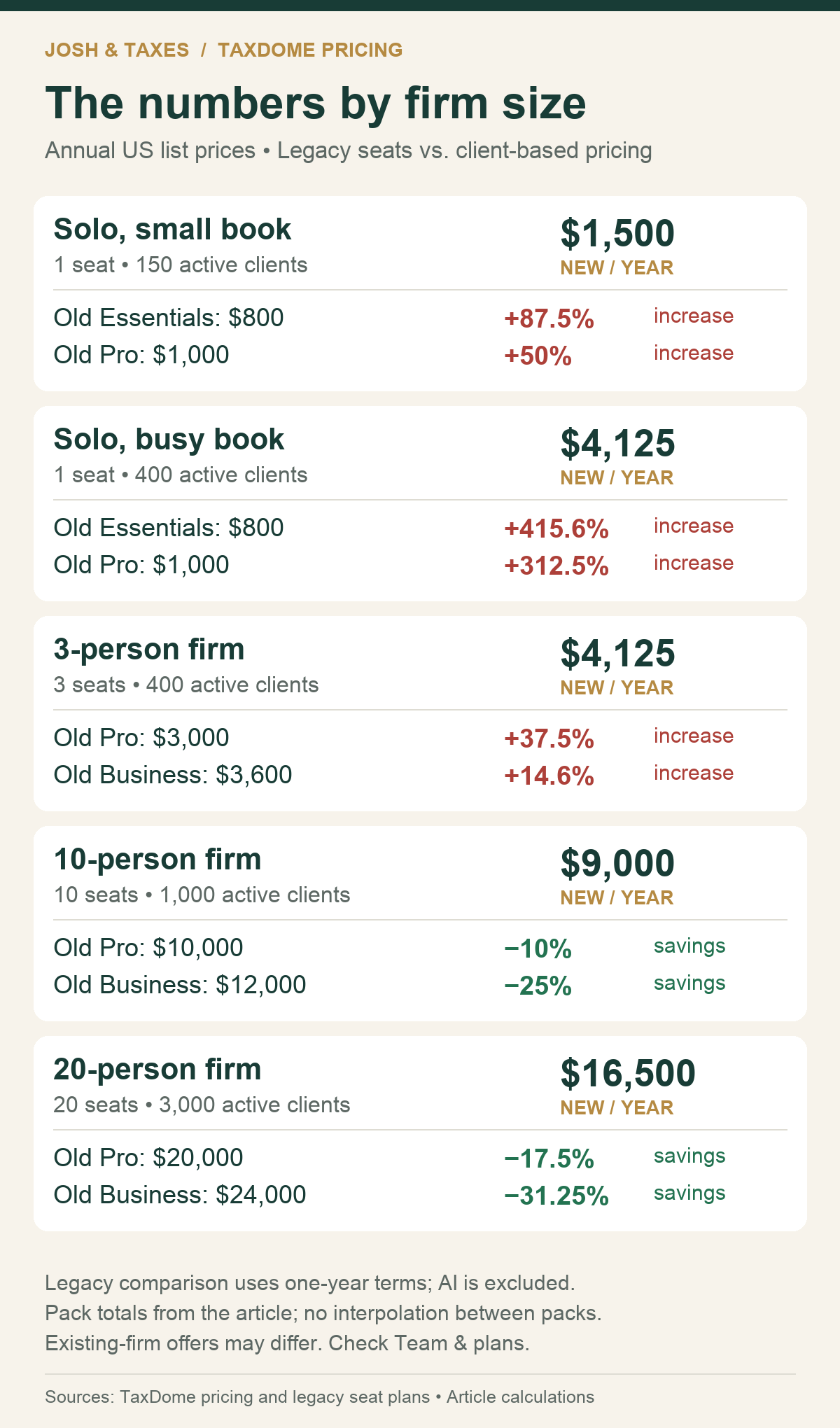
The busy solo takes the largest percentage hit in these examples. One Pro seat at $1,000 becomes $4,125 for 400 accounts, an increase of 312.5%.
The 10-person firm with 1,000 accounts goes the other direction: $10,000 under Pro becomes $9,000, a 10% reduction.
Client Care also changes the comparison for former Business users. It was included with Business; keeping it after the current license ends costs another $100 a month.
For the three-person firm with 400 accounts, the $4,125 base subscription plus $1,200 annually for Client Care totals $5,325. Compared with three legacy Business seats at $3,600, that is a 47.9% increase.
Run the comparison using the features you will actually retain.
What It Costs Per Client
The optional AI add-on is $200 a month, or $2,400 for a full year. The AI add-on is also available on legacy plans, so its cost is separate from the switch to client-based pricing.
Here is what the subscription costs look like when spread across the accounts in each example.
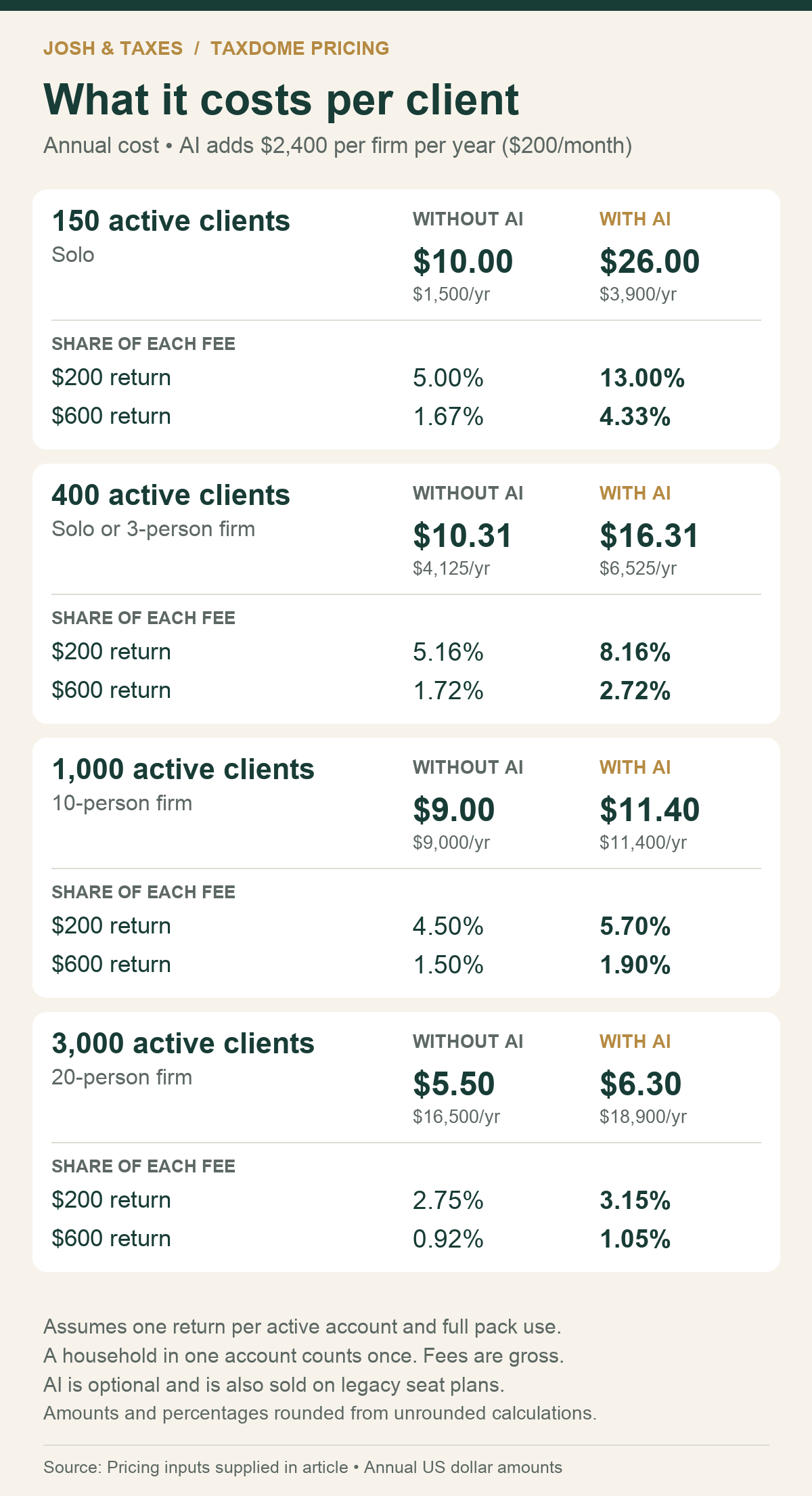
These calculations assume full use of the illustrated account allowance, one return per active account, and 12 months of AI in the AI examples. A household set up as one account counts once.
At 150 accounts, the base subscription plus AI totals $3,900 annually, or $26 per account. If each account produces one $200 return, that is 13% of the gross fee before tax software, e-file fees, insurance, continuing education, or anyone’s time.
That does not mean every $200 service is badly priced. A tightly limited service can have different economics from a complex return.
It does mean you should know what your $200 includes and whether the work makes money.
The AI Add-On Has Its Own Timeline
Starting November 5, US firms need the AI add-on or an active trial to use the paid AI features. Those include document renaming, tagging, AI-assisted return delivery, and API and MCP access. AI matching for document checklists remains free.
The trial lasts 14 days and converts to a paid subscription unless canceled. The add-on works with any TaxDome plan, so this date can affect you before your base subscription renews.
Review both decisions: whether the functionality is worth paying for, and whether you are comfortable with how it handles client information.
Read the Data Terms Alongside the Pricing
Tom Gorczynski, EA, USTCP, and I have written about OPR’s AI guidance as well as AI and 7216 disclosure and use. We also founded the AI research tool AskTomG.AI.
There are several provisions I would want every firm owner to read.
Continued use matters. Section 26 of the Terms of Service ties acceptance of the supplemental AI terms to using an AI feature or continuing to use the service. Turning off an AI feature does not, by itself, answer every contractual question about data use.
The Data Processing Addendum permits certain improvement and anonymization uses. Section 1.3 of the DPA allows internal use of personal data for product and service improvement where permitted by applicable law. It also allows TaxDome to generate anonymized data from customer data and use it for lawful purposes, subject to restrictions against reidentification.
The Privacy Policy distinguishes personal data from anonymized and aggregate data. It says personal data is not used to train TaxDome AI models or commercial third-party models, while separately permitting uses of anonymized and aggregate data, including commercialization. The policy also describes a Google safety-monitoring exception under which certain processed data may be retained for up to 30 days.
Those distinctions deserve attention.
They do not establish that TaxDome is selling tax returns, training models on identifiable client information, or violating the law. A permission in a contract, an actual business practice, and a legal conclusion are three different things.
But a firm owner should understand all three before deciding the paperwork is routine.
Public Assurances Need Clear Explanations
TaxDome’s Trust Center gives a broad assurance that customer data is not sold or used for AI training. Its Section 7216 help article says using TaxDome does not require taxpayer authorization and relies on a statement that TaxDome does not have access to client documents.
Meanwhile, the Privacy Policy explains that certain AI features process and collect language from submitted documents.
There may be distinctions involving automated processing, human access, particular features, and different categories of data. Those distinctions need to be explained in a way a practitioner can apply.
I want to know which statements cover ordinary portal storage, which cover AI processing, and which cover information derived from client documents.
A general security assurance is useful. A specific answer about a specific workflow is more useful.
Where Section 7216 Comes In
Section 7216 addresses knowing or reckless unauthorized disclosure or use of tax return information by people engaged in preparing returns or providing services connected with their preparation. Its reach is broader than the person signing the return.
The regulations include certain auxiliary service providers within the definition of a tax return preparer. Whether a vendor or activity falls within those rules depends on what it actually does.
They also explicitly include statistical compilations of tax return information, even when the information cannot identify a particular taxpayer. Removing a name does not automatically remove the information from Section 7216.
Section 6713 ordinarily imposes a civil penalty of $250 per unauthorized disclosure or use, subject to a $10,000 annual limit. Higher penalties apply to disclosures or uses connected with identity theft.
The practical question is not simply whether a vendor calls something anonymous. It is what information is involved, who receives it, what they do with it, and what legal authority permits that activity.
Follow the Information Through the Workflow
Imagine a couple uploading W-2s, a brokerage statement, and last year’s return.
Storage, document organization, substantive tax analysis, and product improvement are different activities. They should not receive one blanket answer.
Treasury Regulation §301.7216-2(d)(1) permits certain disclosures to US-based preparers for preparation assistance or auxiliary services without taxpayer consent. That exception does not authorize disclosures for another preparer to make substantive determinations affecting tax liability.
There are also exceptions for specified software updating, testing, and contractor activities under paragraphs (c) and (d), with conditions. Product improvement is not automatically prohibited, but neither is every improvement use automatically covered.
Paragraph (o) separately governs certain statistical compilations, including permitted purposes and restrictions on selling or exchanging them.
My read is that organizing a document and asking a connected AI tool whether a loss is deductible require different analyses. That is an application of existing rules, not a claim that the IRS has issued a definitive ruling on every modern AI workflow.
If you connect your own AI service through API or MCP access, review that arrangement separately. A provider appearing on TaxDome’s subprocessor list does not automatically place your independent account with that provider under TaxDome’s contract.
US Storage Does Not Settle the Offshore Question
The DPA permits processing in locations where TaxDome, its affiliates, or subprocessors operate. That permission does not prove a particular US client’s information goes abroad, but it makes the question worth asking.
The regulations contain an example in which an overseas employee views return information stored on a US server. That access is treated as an offshore disclosure even though downloading and printing are restricted.
Ask about storage, processing, and access, including support access.
For offshore disclosures, taxpayer consent requirements and special Social Security number restrictions can apply. The SSN rule has an exception involving adequate safeguards; it is not an absolute prohibition. Revenue Procedure 2013-14 supplies relevant consent and safeguard requirements.
“Hosted in the United States” answers only part of the question.
Your Agreement Is Not Your Client’s Consent
TaxDome’s terms put responsibility on the firm for required permissions and legal bases. They also state that TaxDome does not obtain client consent on the firm’s behalf.
That does not mean every use requires consent. An applicable exception may authorize the activity.
But where consent is required, accepting a vendor’s terms does not substitute for obtaining it from your taxpayer. For Form 1040-series taxpayers, the consent rules include specific requirements; an ordinary privacy notice or opt-out mechanism is not an interchangeable substitute.
The firm needs to understand the actual use before it can determine whether an exception or a consent covers it.
This Belongs in Your Vendor Review
The FTC Safeguards Rule requires covered firms to oversee service providers: select providers capable of appropriate safeguards, require safeguards by contract, and periodically assess providers based on their risks and the continued adequacy of their protections.
The exemption for institutions maintaining information on fewer than 5,000 consumers does not eliminate those service-provider oversight requirements.
A change involving AI, subprocessors, and contractual data permissions is a reason to revisit that review and document the result with your WISP materials.
The useful record is more than a downloaded policy. It includes what you asked, what the vendor answered, which features you enabled, and why you accepted the remaining risk.
What I Would Do Before Renewing
First, inspect the settings. Review AI features and API/MCP connections separately. Document what is enabled and who can authorize access.
Second, ask written questions that require specific answers.
Which providers and models process our clients’ document content?
Where is that content stored, processed, and accessible to people?
What information is retained, for how long, and for what purpose?
Does any return information support product improvement, training, or commercialized datasets?
What exclusions are available, and which uses continue when AI features are disabled?
TaxDome’s terms provide for client exclusion from AI processing upon request. Ask how that works operationally. Do not assume it creates a firm-wide opt-out from every anonymized or aggregate use.
Third, test your exit. Export representative records and open them. Check documents, messages, signatures, and other records you would need to retain. A promise to delete data is not the same as a usable migration package.
Fourth, calendar cancellation early. The Terms of Service describe seven days before renewal, while the Help Center says seven business days. Use the earlier deadline and obtain confirmation.
Fifth, compare the whole cost. Include the base plan, AI, Client Care, other add-ons, implementation, migration, and staff time. Switching software has a price even when it does not appear on the subscription invoice.
Finally, review your own fees. Identify the work that produces too little revenue for the time and cost involved. Decide whether to change the scope, raise the price, or stop offering it.
A vendor’s increase does not automatically justify every fee increase you might make. It does give you a reason to stop treating last year’s price as a business plan.
“I’ll Just Build My Own TaxDome!”

I also saw suggestions that firms should vibe-code their own version of TaxDome. Others suggested firms should develop their own software.
I like these tools. I use them. But getting a dashboard to appear is a very different accomplishment from operating a secure client portal.
You still own authentication, access controls, backups, security testing, updates, and whatever breaks during tax season. You also own the consequences when one client can see another client’s documents.
Build something useful. Experiment with fake data. But “the AI said it was secure” is not a security review, and your clients’ tax returns should not be the test dataset.
The question is whether building, securing, and maintaining that software is a good use of your firm’s time and money. Include your own time in the calculation.
A Price Increase Can Be Reasonable and Still Deserve Scrutiny
TaxDome is a business. Software development, support, infrastructure, and AI all cost money. It is allowed to change its pricing, and firms are allowed to decide the new offer no longer works for them.
The reaction to the announcement was understandable. I also think the announcement could have been handled better. A busy solo and a larger team can experience this change very differently, and moving a portal is much harder than canceling an app you barely use.
But after the social media conversation comes the work: checking your offer, reading the agreement, reviewing the data flows, and deciding what fits your practice.
I would not decide to stay simply because switching feels inconvenient. I would not decide to leave solely because my social media feed is angry. I would want the economics and the answers in writing.
My rent has gone up. Insurance has gone up. Tax preparation software has gone up. Those increases affect what it costs to run my practice, and I need to account for them in my own pricing.
If you’re still doing $200 returns, know exactly what that fee buys and what it costs you to deliver. If you haven’t run those numbers lately, this is your wake-up call. We are in business to make money. I also believe in pro bono and reduced-fee work when appropriate. The point is to make that choice deliberately and understand what it costs.
TaxDome priced on purpose. Read its terms on purpose, then price your own work the same way.
How does your renewal offer compare with what you pay today? Are you staying, switching, or rethinking your own fees? Leave a comment.
Pricing and policies checked November 3, 2026. Dollar examples use US pricing.
I have over 1200 clients and 6 full time users of TD and one seasonal. I paid $6500 for 2025. My new offer is $9,713! 50% increase. I have just moved to implement Ignition into my practice as I dislike TD entire engagement letter section. I likely will move to Karbon which does integrate with Ignition and a price point of $5300 for my team. I appreciate your article on the other items TD changed. I will need to review all these on any new software or portals I implement. Not something I am relishing, changing portals for all clients.