


I have a friend who uses Microsoft Edge and Bing (I think that was once a search engine?), I routinely give her a hard time because, well, it is fun. My spouse uses Firefox, and every time I sit down at his computer, I’m like, " What is this, 2000? Well, maybe they are on to something. (We can’t tell them that, though.)
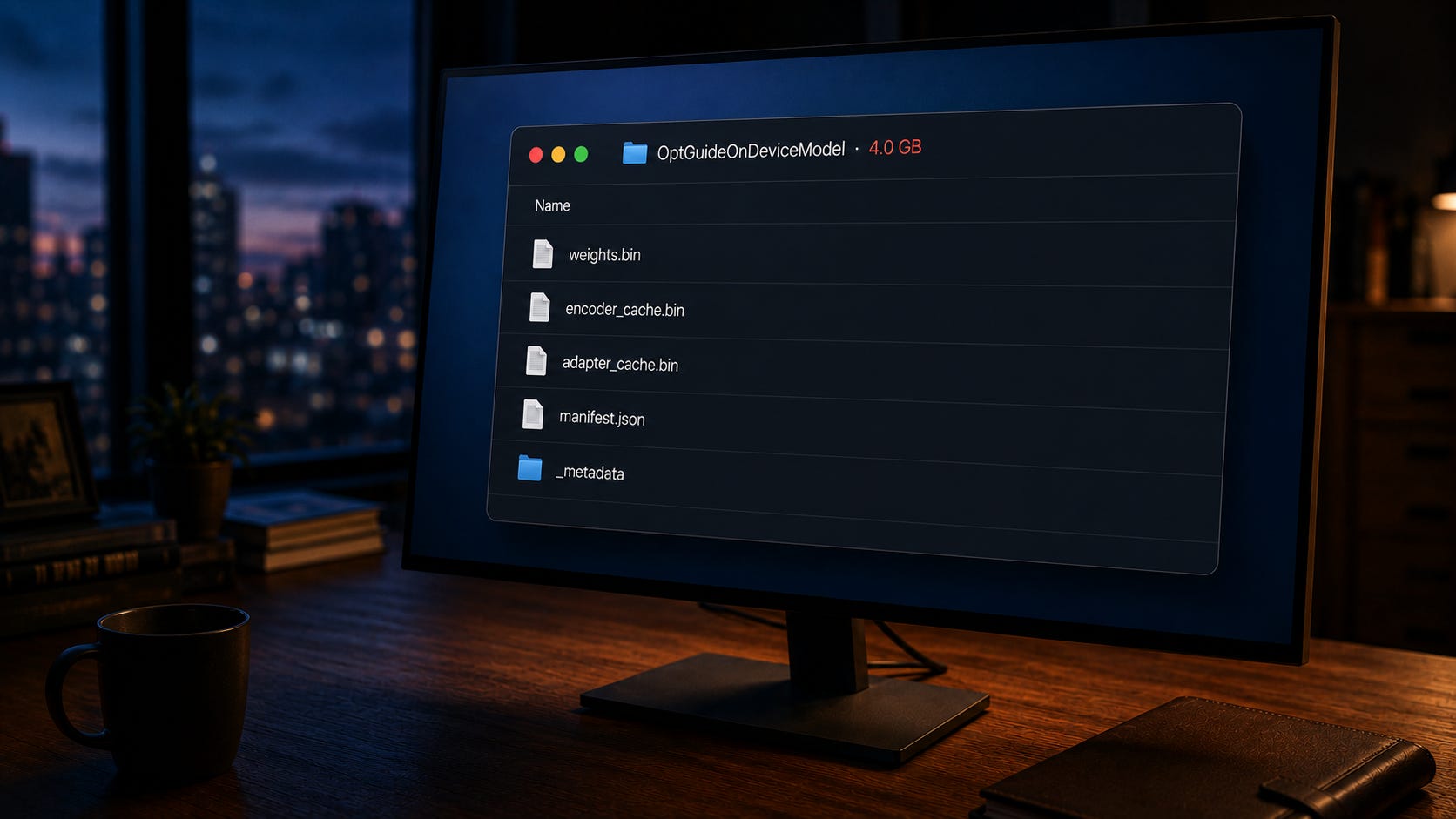
Google Chrome has been up to something. Open File Explorer or Finder. Navigate to your Chrome user profile directory. Look for a folder called OptGuideOnDeviceModel. That folder is likely 4 gigabytes in size. You did not download it deliberately. You did not see a prompt. If you delete it, Chrome will quietly put it back the next time the right conditions trigger.
That file is Gemini Nano, Google’s on-device large language model. It is being deployed silently to any device that meets Google’s hardware threshold and triggers any feature that uses it. There was no consent prompt. There was no settings toggle until February of this year, and even now, the toggle is rolling out unevenly across operating systems and Chrome versions. Delete the file, and Chrome will redownload it the next time a triggering condition fires, unless you have first disabled the underlying flags. Security researcher Alexander Hanff documented the behavior, and outlets including The Verge, Tom’s Hardware, Android Authority, Gizmodo, and Malwarebytes have since confirmed it on Windows, macOS, and Linux.
Set the privacy lawyers and the EU regulators aside. As a pure security matter, the behavior pattern is the part that should bother you.
Pattern recognition
Walk through what Chrome actually did on your machine.
It downloaded several gigabytes of new code and data without notifying you. It installed that payload into a directory in your user profile that you almost certainly did not know existed. It did not ask whether you wanted the feature. It did not tell you what the file does. If you find the file and delete it, it puts the file back. The opt-out is buried behind two experimental flags in a developer settings page that no normal user will ever open, plus a Settings menu toggle that may or may not be present depending on your version.
There is a worse detail. Researchers analyzing Chrome’s internal feature flags found that the browser enables the OnDeviceModelBackgroundDownload flag before the corresponding user-facing settings are exposed. Translation: Chrome can begin pulling the model to your machine before any control surface exists for you to see it on, much less object to it. The setting that would let you say no is published after the fact.
Read the previous two paragraphs again with the vendor name redacted. Pretend you do not know who shipped this. The security community has a phrase for software that installs itself without consent, hides in obscure folders, persists across user removal, and ships its control surface after the install begins. The phrase is not flattering.
The argument that Google is a trusted vendor and therefore the behavior is acceptable inverts the security model. Trust is what allows you to install software in the first place. It is not what software is supposed to use to justify behavior you would otherwise reject. A trusted vendor that ships malware-shaped behavior is in some ways the worse outcome, because the defenses you have in place are less likely to flag it.
What actually triggers the download
The trigger pattern deserves its own attention. The model does not necessarily install the moment you launch Chrome on qualifying hardware. It downloads when something activates a feature that uses it.
A user clicking Help Me Write triggers it. A website you visit calling the Summarizer API triggers it. An extension you have installed requesting an Origin Trial token triggers it. AI-assisted tab grouping, autofill, smart paste, page summarization, on-device scam detection, and writing suggestions can all trigger it.
The set of conditions that can cause Chrome to begin pulling several gigabytes of code and weights to your computer is broader than most users would guess, and it includes conditions that third parties decide for you. Loading the wrong page is enough.
What the install expands
The presence of the model itself adds attack surface to your machine.
Gemini Nano on Chrome powers a growing list of features. Help Me Write. On-device scam detection. Smart paste. Page summarization. AI-assisted tab grouping. Autofill. Writing suggestions. A Summarizer API that any website you visit can call. Each of those is a code path that takes input and produces output, all running on your machine, all sharing the same underlying model.
For anyone with a security background, the relevant questions are the ones you would ask about any new local service. What inputs can reach it? What outputs can it produce? What other components on the system can interact with it? What is the audit trail when the service runs? Where are the logs?
Chrome has not made those answers easy to find. The Summarizer API is callable by any origin without a meaningful consent mechanism. Help Me Write integrates with text fields, including those inside web applications you may use for sensitive work. The model itself updates through Chrome’s existing update channel, which means the integrity of what runs on your machine is downstream of whatever Google decides to ship next, on whatever schedule Google chooses, with no separate review or approval step.
For most users, none of that matters in any practical sense. For anyone whose endpoint touches data they care about, it matters the same way any unaudited local service running with user privileges has always mattered.
The bigger pattern
Hanff connected the Chrome behavior to a broader trend across desktop platforms. Microsoft is embedding Copilot into Windows and Office on a similar trajectory. Anthropic’s Claude Desktop reportedly installed browser integration bridges across Chromium browsers without a prompt. The default posture for major software vendors right now is to ship AI features and explain them later, if at all.
This is not a one-time incident. It is the new operating mode. Your endpoint is not a stable artifact you configured once. It is a continuously mutating surface that vendors are reshaping in the background, on their schedule, for their priorities.
A security model that assumes your machine looks today the way it looked last quarter no longer holds. Periodic baseline review used to be a hygiene practice you could let slip without immediate consequence. It is now a first-order control. You cannot reason about your defenses if you do not know what is running.
The alternatives are different
Worth being precise about something. This is Chrome’s behavior, not Chromium’s.
Gemini Nano rides on Google’s Optimization Guide component update infrastructure. That infrastructure is a Google service that lives on top of Chromium, not inside it. Other Chromium-based browsers fork from upstream Chromium and strip out Google’s service layer, replacing it with their own. None of them inherit Chrome’s silent model deployment pipeline.
Microsoft Edge keeps its AI cloud-routed. Copilot in Edge sends prompts to Microsoft’s servers, the same way Chrome’s omnibox AI Mode does. No silent multi-gigabyte local model installed by the browser. Edge has its own issues, and Microsoft is pushing on-device AI hard at the operating system level on Copilot+ PCs, but that is OS-level deployment tied to specific hardware classes you bought deliberately, not browser-level silent install.
Brave strips Google services from Chromium aggressively and replaces them with its own privacy-focused versions. Brave’s AI assistant, Leo, is opt-in, defaults to cloud routing through an anonymizing reverse proxy, and supports a Bring Your Own Model option for users who want to run local models through Ollama. Local models in Brave are user-installed, not browser-installed.
Vivaldi went the other direction entirely. The CEO put it in writing last year that Vivaldi will not ship AI features in the browser. If your concern is exactly the pattern Chrome is establishing, Vivaldi is the most aligned Chromium browser available.
Opera, Arc, Dia, Comet, and the rest of the AI-forward Chromium browsers each handle integration differently. None has been documented doing the Chrome-style silent local install.
Firefox is not Chromium-based at all. Mozilla uses the Gecko rendering engine and operates under different governance from Google, Microsoft, or Apple. Firefox does have AI features, and it has explicit, documented user controls for them. As of Firefox 148, released in February of this year, an AI Controls panel in Settings lets users disable every generative AI feature in the browser with a single “Block AI enhancements” toggle. Smaller features like language translation and PDF alt text use local specialist ML models, but they are listed in the panel and individually toggleable. The optional sidebar chatbot routes to third-party providers the user picks (ChatGPT, Claude, Gemini, Copilot, or Mistral), not one Mozilla assigns. Mozilla has publicly committed to a kill switch approach for future AI features. None of this is a silent multi-gigabyte LLM install.
Safari is the other major non-Chromium browser, and it ships only on Apple platforms. Its AI integration is Apple Intelligence, which is an operating system layer rather than a browser feature. Apple Intelligence requires explicit opt-in, requires specific hardware (Apple silicon Macs, recent iPhones and iPads), runs many tasks on-device using Apple’s own model infrastructure, and routes more complex tasks to Apple’s Private Cloud Compute. Settings includes an Apple Intelligence Report panel that logs what was processed off-device. Whatever your view of Apple’s broader posture, none of this is the Chrome silent install pattern. The model deployment ships through OS updates with explicit consent flows, not through browser background downloads.
The point is not that any of these browsers is perfect. The point is that silent multi-gigabyte local model deployment is a Chrome decision, not a Chromium constraint. If you switch off Chrome, you do not inherit this problem.
Check your own machine
Before you act, verify what is actually sitting on your disk.
On macOS, open Terminal and run:
du -sh ~/Library/Application\ Support/Google/Chrome/OptGuideOnDeviceModel/
That returns the total size of the folder including everything inside it. If you prefer Finder, press Cmd + Shift + G, paste in ~/Library/Application Support/Google/Chrome/OptGuideOnDeviceModel/, then right-click the version subfolder inside and choose Get Info to see the rolled-up size.
On Windows, press Win + R, paste in %LOCALAPPDATA%\Google\Chrome\User Data\OptGuideOnDeviceModel\, then hit Enter. In File Explorer, right-click the version subfolder, choose Properties, and read the size off the dialog.
A few things to know going in. The OptGuideOnDeviceModel folder contains a versioned subfolder with a name like 2025.8.8.1141, and the actual model lives one level deeper inside that. Alongside weights.bin you will find smaller sibling files including encoder_cache.bin, adapter_cache.bin, manifest.json, and _metadata. If you check the size of a single file rather than the whole folder, you may be looking at a sibling that is one or two hundred megabytes rather than the main weights. The file you want to verify, specifically, is weights.bin. Reports across the major coverage put it in the 2GB to 4GB range, with Google itself acknowledging that the exact size varies by Chrome version and hardware tier.
Mine was exactly 4.0 gigabytes. That number landed without notice on a network managed end-to-end with endpoint protection on every machine. If your number is similar, your defenses missed it, too.
That is the article in one sentence.
What to do this week
You have two paths. They are not mutually exclusive.
If you are staying with Chrome:
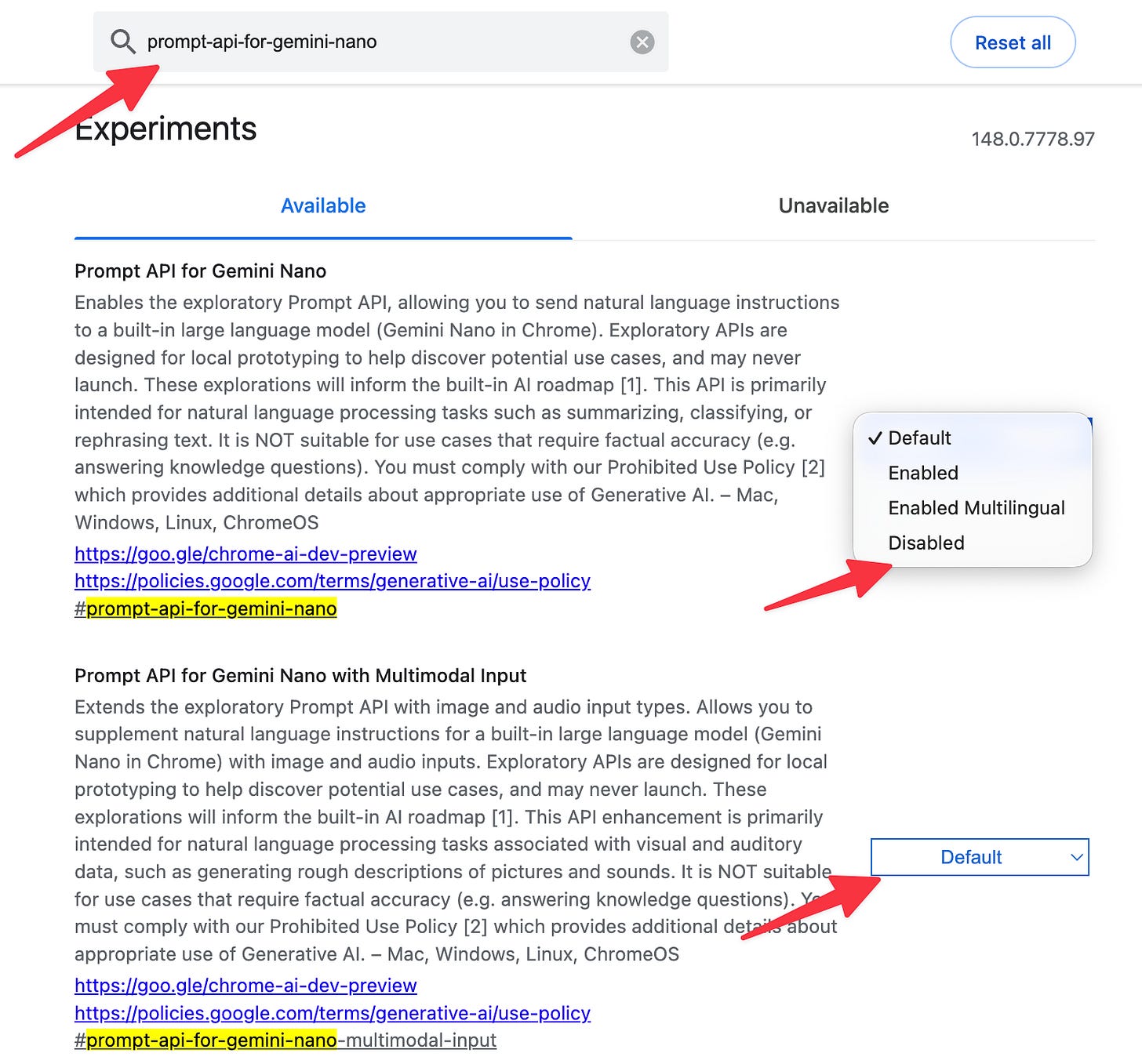
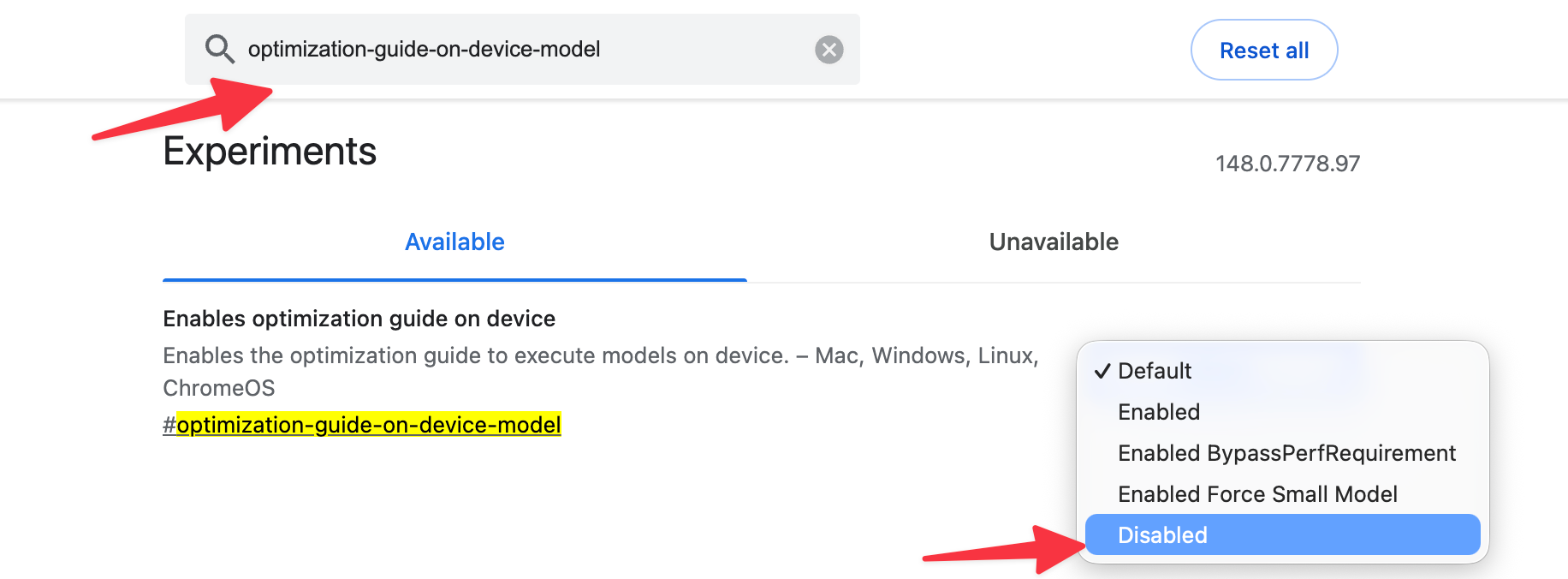
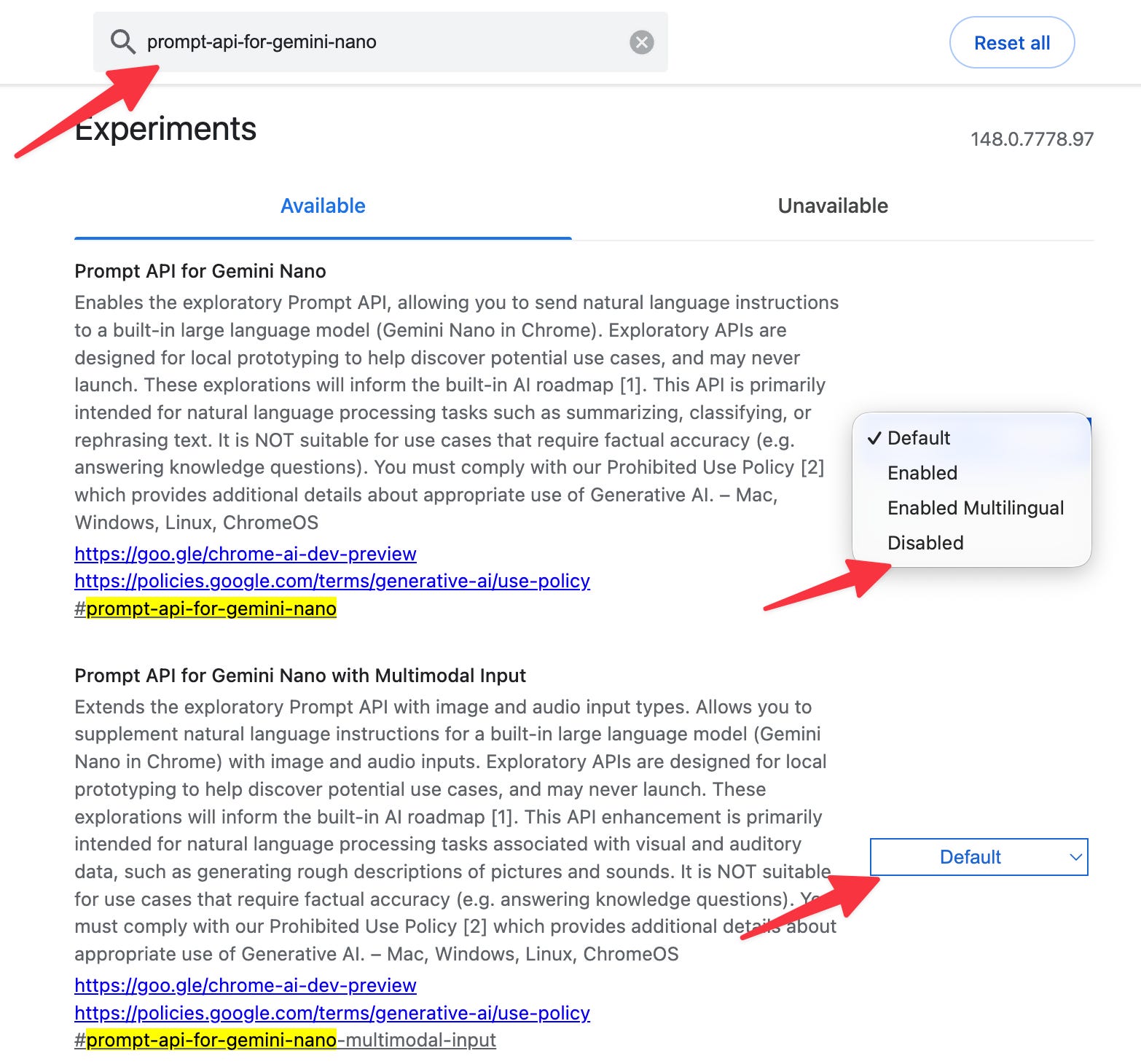
Open Chrome. Type chrome://flags in the address bar. Find
optimization-guide-on-device-modeland set it to Disabled. Findprompt-api-for-gemini-nanoand set it to Disabled. Restart Chrome when prompted.Set to disabled
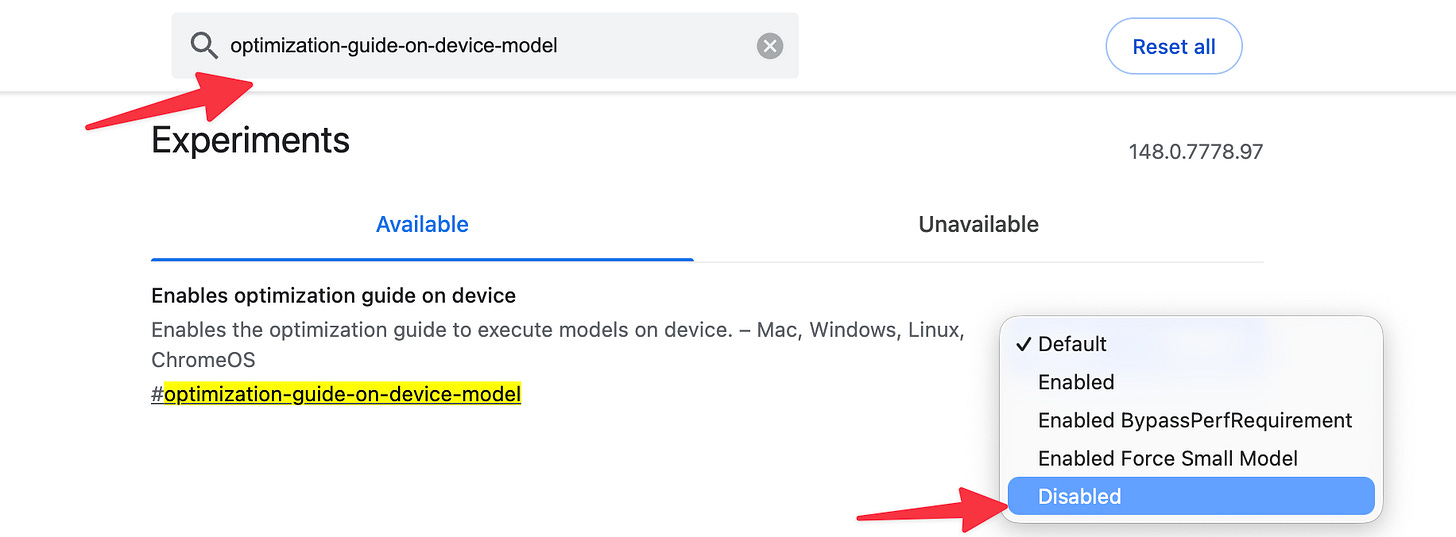
Set both disabled
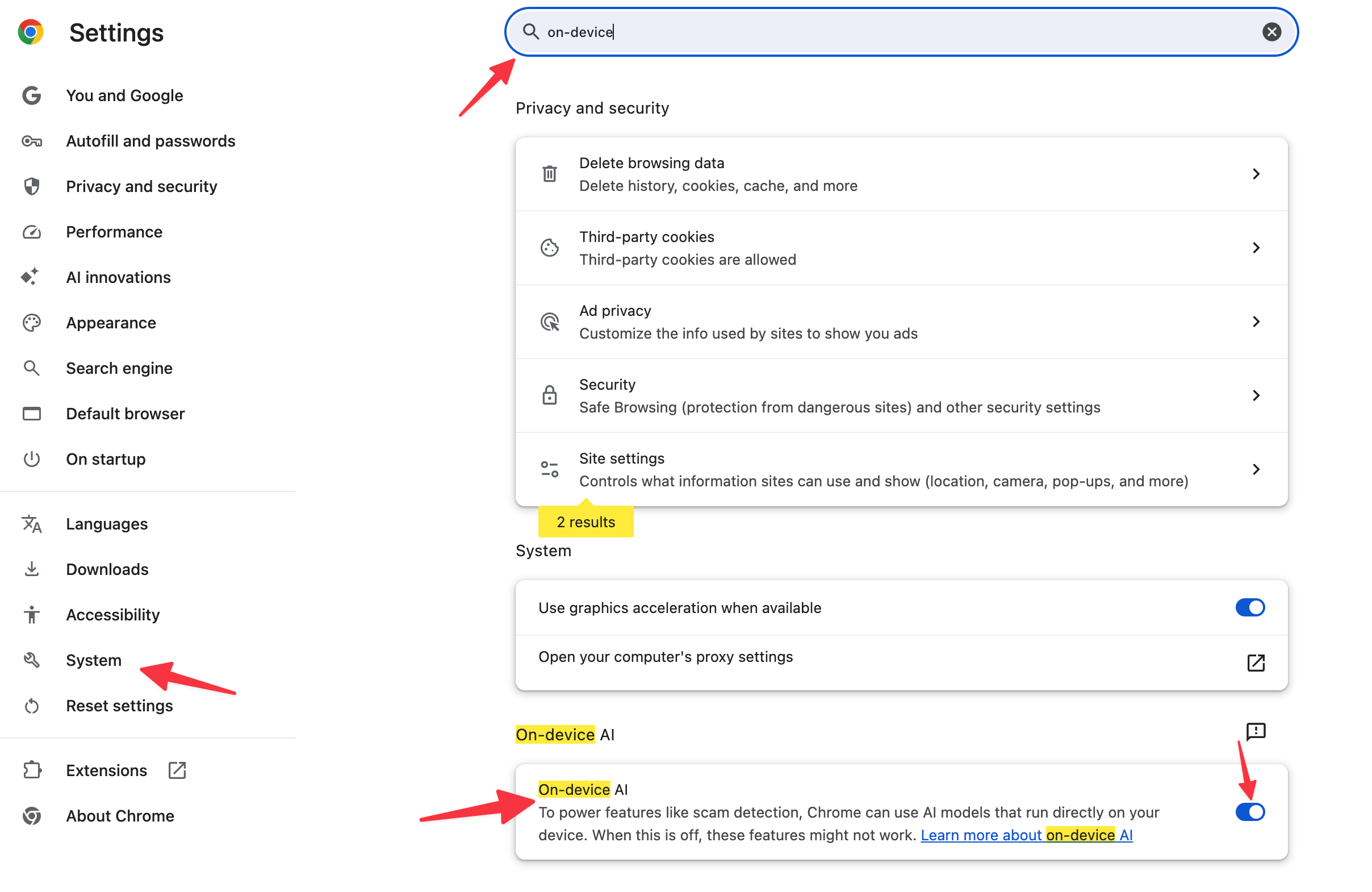
Go to Settings > System and look for an “On-device AI” or “Use AI features in Chrome” toggle. The rollout is uneven across versions and operating systems, so this option may or may not be present. If it is, switch it off.
Navigate to the OptGuideOnDeviceModel folder using the paths mentioned above. Delete its contents. With the flags disabled, Chrome will not redownload the model.
Review your endpoint protection logs and network monitoring for the past several months. A 4GB download from Google’s servers should have left a trace. If your tools did not flag or even log the event, you have a visibility problem worth fixing on its own merits.
Put a recurring quarterly task on your calendar. Walk through what is actually installed on each of your machines, compared to what you assume is installed. If the comparison surprises you, you have just learned something useful.
If you are leaving Chrome, and you should consider it:
The friction has dropped close to zero. Brave, Edge, Vivaldi, and Firefox all import bookmarks, passwords (You should be using a dedicated password manager), extensions, and history from Chrome in a couple of clicks. Most extensions you use will work in any Chromium browser unchanged. A small number of sites still test only against Chrome, and the workaround is to keep Chrome installed for those specific cases with AI features disabled per the steps above, and run something else as your daily driver.
Three reasonable paths:
Brave is the easiest recommendation for practitioners who want a Chrome-equivalent experience with adversarial privacy defaults. Drop-in replacement for daily use.
Vivaldi is the recommendation for practitioners who specifically want a browser whose vendor has publicly refused to ship AI features. Most aligned with the concern this article raises.
Firefox or LibreWolf are the recommendations for practitioners who want out of the Chromium monoculture entirely. Firefox has added some local AI features but they are opt-in and not deployed Chrome-style. LibreWolf strips them. Different rendering engine, different governance.
Safari is the natural recommendation for Mac, iPhone, and iPad users already in the Apple ecosystem. Apple Intelligence is hardware-gated, opt-in, and surfaces what it does. Different engine, different governance, opposite deployment posture from Chrome.
None of them is perfect. All of them are better on the specific axis at issue here than Chrome is right now.
The takeaway
The takeaway is not that Google is uniquely guilty. When I was reading about this earlier, I remarked to a friend that “Big tech is so #$*&# corrupt,” and his response was “Especially a company that once had the motto don't be evil.” Major software vendors have collectively decided that pushing AI features as default-on, opt-out-buried features is acceptable. They are correct that most users will not push back. They are wrong about whether the behavior is fine.
You do not have to accept it on the machines you control. The simplest move this week is to stop using Chrome as your daily driver. The longer move is to apply the same scrutiny to everything else running on your endpoints with your privileges. Both are overdue.
What browser are you using?
When I searched for the folder, I found it was 6.4 GB. That is shockingly large and may explain much of the browser PC issues that I was experiencing (new PC installed late summer 2025, issues started occurring in December, which coincidentally was when the folder shows as installed).
I was talking with my husband this morning when I started reading this. He was also pointing out that we as tax practitioners should be careful of our extensions and add-ons. Do you have an ad-blocker? It has to look at the content of every site you go to - banking sites, tax portal, IRS.gov, tax prep software (if you are online), etc. Do you have other extensions and what is their security?